Looking to tame desk clutter and protect cords in a safe, professional way? J-channel cable management kits are a practical choice for homes and offices. They’re easy to install, mostly tool-free, and work well for desks, workstations, and entertainment setups. This guide highlights five top options, explains who each is best for, and helps you pick the right kit for your space and cable load.
Product Snapshot
| Product | Best For | Key Benefit |
|---|---|---|
| EVEO Cable Management Under Desk Kit (6 Units) | Desks with lots of cords; heavy cable loads | High capacity, tool-free installation |
| YECAYE 6 Pack Cable Management | Budget-friendly, quick setup | Six channels with adhesive, easy removal |
| ZhiYo Cable Management Under Desk J Channel | Longer runs, modular layouts | 63 inches total, large capacity |
| VIVO Under Desk 17 Inch Cable Management Tray (DESK-AC06-1C) | Low-profile tray + mounting | Under-desk tray with front-access |
| No-Screw Under Desk Cable Management Tray (Set of 2) | Hassle-free install on smooth surfaces | Self-adhesive with minimal effort |
EVEO Cable Management Under Desk Kit
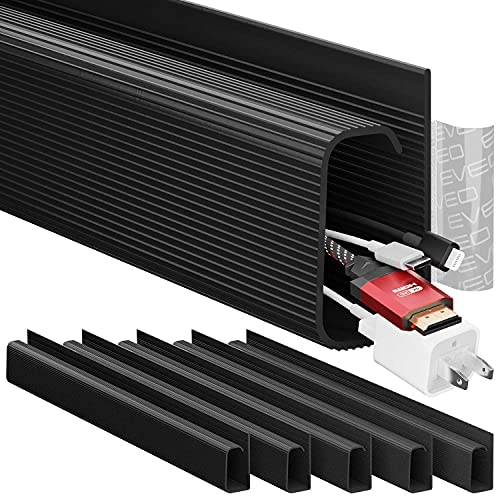
Best for high cable loads. This 6-unit set provides a full under-desk raceway system capable of organizing up to 10 power cords or 16 ethernet cables. The product emphasizes a sleek, professional look and tool-free installation via strong adhesive. It suits larger workstations, media centers, or setups with many peripherals demanding strong organization and a clean surface.
Who it’s for: people with dense cable runs, home offices, gaming desks, and multi-device workstations. Why selected: its high capacity and cohesive kit approach reduce clutter quickly without drilling.
Caution: Adhesive strength matters on rough surfaces; ensure the desk top is smooth and clean before sticking.
YECAYE 6 Pack Cable Management

Best budget-friendly option with quick adhesive setup. This kit includes six J channels (each about 15.7 inches long) designed for desks, computer tables, and home offices. It features an outward-facing opening for easy cable insertion and removal, making layouts adaptable and user-friendly for changing setups.
Who it’s for: students, small home offices, or anyone seeking a cost-effective, reliable cable pathway. Why selected: strong adhesive and removable design provide flexible, damage-free installation.
Caution: Adhesive performance can vary on textured surfaces; use heat if removing, and avoid dusty/uneven surfaces for best sticking results.
ZhiYo Cable Management Under Desk J Channel

Best for longer, modular runs. Includes four 15.75-inch J-channel raceways totaling 63 inches, with adhesive strips and reusable ties. It offers a large-capacity channel to hide multiple cords, including power and data lines, creating a safer, tidier desk space.
Who it’s for: users needing substantial under-desk cable coverage without cutting or drilling. Why selected: combination of long channels and adhesive makes it versatile for multi-device desks.
Caution: Do not apply on dusty or uneven surfaces, as adhesive performance can diminish; heat with a hairdryer to remove if needed.
VIVO Under Desk 17 Inch Cable Management Tray (DESK-AC06-1C)

Best for a low-profile look with easy access. This tray measures 16.5” x 3” and mounts under desks with included screws. The partially closed design conceals cords and power strips while the front opening provides simple cable changes, suitable for clean, modern setups.
Who it’s for: users who want a discreet, mounted tray that hides wires with straightforward front access. Why selected: sturdy low-profile design that blends with both home and office environments.
Caution: Size matters—verify your desk width and clearance to ensure full tray fit and clearance for plugging in devices.
No-Screw Under Desk Cable Management Tray

Best for tool-free, adhesive-only installation. This set of two black cable trays emphasizes quick, damage-free installation with strong adhesive backing. It’s designed to improve desk aesthetics by reducing visible cable clutter without drilling holes.
Who it’s for: renters, temporary setups, or anyone preferring a non-permanent solution. Why selected: simple, adhesive-based installation and clean, minimal appearance.
Caution: Adhesive strength on textured surfaces may be reduced; ensure a smooth surface and consider pre-cleaning for optimal sticking power.
Buying Guide: Key Considerations for J Channel Cable Management
- Desk surface compatibility: Smooth surfaces improve adhesive performance; avoid textured wood or powder-coated finishes without testing.
- Cable load capacity: Estimate the number of power cords, Ethernet cables, and HDMI wires to choose a high-capacity kit if you have a busy setup.
- Installation method: Decide between adhesive-backed trays and screw-mounted trays. Adhesive is faster; screws offer more permanence on sturdy desks.
- Length and layout: Longer runs and modular kits provide flexibility for desks with long cable runs or multi-device layouts.
- Maintenance and removal: Consider how easy it is to remove or reposition channels; look for heat-assisted removal to minimize furniture damage.
- Safety and aesthetics: A clean cable path reduces tripping risk and protects pets and kids; matching finishes (black, white) improves visual harmony with your workspace.
Frequently Asked Questions
- What is a J-channel cable management system?
- Do these kits require drilling?
- Can I remove these without damaging furniture?
- Which kit is best for a large computer setup?
- How do I maintain a neat desk after installation?
A J-channel system uses U-shaped channels that snap over or mount along desks to route and conceal cables, creating a neat surface and protected pathways.
Most kits shown here are designed for tool-free installation with adhesive backing, though some offer screw-mounted options for extra security.
Yes, many kits include removable adhesive or heat-assisted removal to minimize marks or residue on desks and walls.
The EVEO kit offers high capacity and a full raceway system, making it well-suited for desks with multiple devices and cables.
Regularly check cable entries, reorganize as devices change, and consider labeling cords to simplify future adjustments.