When selecting a vacuum cleaner specifically for PC cleaning, look for compact, low-profile devices that deliver strong suction without risking delicate components. The top picks below are suited for different buyer needs: compact carousal-style handhelds for quick keyboard cleanups, multi-function 2-in-1 tools for laptops and desktops, and powerful air dusters with integrated vacuums for deep-cleans. Each option is assessed for suitability to avoid damage while maximizing dust removal.
Summary of chosen products:
| Product | Best For | Why It Stands Out |
|---|---|---|
| KMM Handheld Car Vacuum Cleaner | Everyday PC, Keyboard, and Car Cleaning | 2-in-1 vacuum and air duster with rechargeable battery and LED light. |
| Meudeen 14500 Pa Computer Vacuum Cleaner | Compact Desktop Cleaning | Ultra-compact design with strong suction and 3-in-1 functionality. |
| Compressed Air Duster & Vacuum Cleaner (Glowsky) | Deep Crevices and Gadgets | Dual motors and adjustable speeds for precise electronics cleaning. |
| AHNR Compressed Air Duster | High-Volume Dusting and Vents | High RPM, adjustable gears, and long run time with a clear display. |
| JVSCAM F30 3-in-1 Duster & Vacuum | All-in-One Bag and Device Cleaning | Three-in-one tool with extensive nozzle options for keyboards and bags. |
KMM Handheld Car Vacuum Cleaner
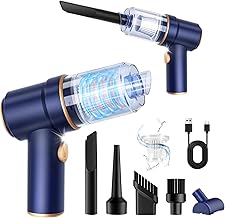
Best for: Quick keyboard and desk cleanups, plus car interiors. This 9000Pa handheld model combines vacuuming and blowing functions in a cordless form factor, with a 4000mAh battery and fast charging. It is ideal for users who need portable power for tight spaces and immediate dust bursts on PC peripherals.
Why it’s selected: The dual-function capability (vacuum and air duster) makes it versatile for keyboards, laptop vents, and dust in crevices. LED light helps illuminate dark spaces under desks or inside PC cases. A caution: avoid using on PCIe connectors or ultra-fine components where static risk could arise; keep the nozzle away from sensitive areas.
Meudeen 14500 Pa Computer Vacuum Cleaner
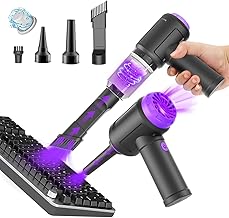
Best for: Ultra-compact PCs, keyboards, and laptop bays where space is at a premium. This mini vacuum weighs about 0.73 lb yet delivers 14500Pa suction and multiple speed options, making it effective for sensitive areas without bulk.
Why it’s selected: Its 3-in-1 capability (vacuum, air duster, and air pump) provides flexible use for keyboards, vents, and storage bags. A caution: battery cycles are mentioned as long-lasting, but real-world runtime may vary by use pattern; plan for charging breaks during large cleanups.
Glowsky Dual-Function Air Duster & Vacuum

Best for: Deep cleaning electronics and car interiors with strong airflow and separate vacuum function. The 130,000 RPM brushless motor provides robust air blowing, while independent dual motors handle suction.
Why it’s selected: Three adjustable speeds enable daily dusting and stubborn debris removal. The built-in high-capacity rechargeable battery reduces replacements. A caution: air blowing can push dust into open vents if not directed carefully; hold at a controlled angle.
AHNR Compressed Air Duster

Best for: High-velocity vent cleaning and electronics, including keyboards, hosts, and car interiors. The duster offers 160,000 RPM and 3 adjustable gears with a long battery life and a clear display.
Why it’s selected: The three-speed options allow tailored cleaning, and the kit includes multiple nozzles and brushes for varied surfaces. A caution: avoid over-reliance on air to move dust that could settle in tight electronic gaps; combine with a gentle suction approach where possible.
JVSCAM F30 3-in-1 Duster & Vacuum

Best for: All-in-one cleaning tasks, including keyboards, storage bags, and car interiors. The F30 combines air blowing, vacuuming, and bag sealing functions, making it a flexible option for comprehensive dust management.
Why it’s selected: The toolset includes multiple nozzles, brushes, and a retention bag vacuum feature to save space. A caution: as a multi-tool, it may feel bulkier than single-function devices in tight computer cases; use the right nozzle for the job.
Buying Guide
What should you consider when choosing a vacuum cleaner for PC cleaning?
- Size and ergonomics: Look for compact, lightweight devices designed for keyboards, laptop bays, and desktop towers. A slim profile reduces the risk of contact with sensitive components.
- Power versus safety: High suction helps remove dust from crevices, but ensure the device has gentle modes or low-speed settings for delicate hardware.
- 1-in-1 vs 3-in-1 functionality: If you mainly clean keyboards and desktops, a 2-in-1 vacuum/duster may suffice. For broader usage (bags, vents, car interiors), a 3-in-1 tool adds versatility.
- Battery life and charging: Rechargeable units are convenient, but verify runtime aligns with your cleaning sessions. Fast charging helps top off quickly between tasks.
- Attachments: Nozzles, brushes, and micro-nozzles improve reach in tight spaces. Ensure attachments are compatible with electronics cleaning to avoid scratching surfaces.
- Maintenance: Reusable filters and easy cleaning extend device life. Avoid devices that require frequent replacement parts for long-term cost efficiency.
Frequently Asked Questions
- Can I use a regular vacuum for PC cleaning?
– Regular home vacuums are generally unsuitable for delicate electronics due to stronger suction and risk of static discharge. Use purpose-built electronics cleaners or filtered handheld vacuums with low suction. - Is an air duster alone enough for keyboards?
– An air duster helps remove loose dust, but combining it with a small vacuum improves debris removal, especially in crevices. - What should I avoid when cleaning a PC?
– Avoid contact with exposed circuitry, avoid water exposure, and use compressed air or low-suction tools to prevent static buildup or component damage. - Are USB-chargeable tools safe for electronics?
– Yes, when used as directed, but ensure devices are powered off and disconnected from power sources during cleaning. - How long do batteries typically last on these devices?
– Battery life varies by model and use; many offer tens of minutes of runtime on a single charge, with longer cycles on lower suction settings.