Answers: These electric air dusters use powered airflow to replace disposable canned air. They’re best for tech enthusiasts, gamers, and DIY tinkerers who clean keyboards, PCs, car interiors, and home electronics. The top picks blend power, portability, and battery life for frequent use indoors and on the go. The following selections emphasize speed, control, and long-lasting batteries, helping you choose the right level of airflow for delicate components or heavy debris.
Summary table of chosen products
- WOLFBOX MegaFlow 50 — 110,000 RPM, 3 speeds, ultra-light, reusable
- MiaEpic Compressed Air Duster — 280,000 RPM, 5 nozzles, USB-C fast charge
- POMELS 110,000 RPM — 3 speeds, LED light, 5 nozzles, versatile
- Anoiiv 130,000 RPM — 3 gears, compact, portable with lanyard
- IT Dusters AirTec Ultra Type 6 — 125 mph, 6 attachments, canvas bag
WOLFBOX MegaFlow 50 Electric Air Duster

The WOLFBOX MegaFlow 50 delivers up to 110,000 RPM with three adjustable speeds. Best for users who need powerful, quick blasts to clear keyboards, computer fans, and vents. Its lightweight build (about 0.45 lb) supports extended cleaning sessions and portable use. The rechargeable battery reduces waste from disposable cans and supports outdoor tasks with a compact form factor. A caution: high speed is most effective for stubborn debris and may move lightweight items if used at maximum power.
GANDASHI Compressed Air Duster, Cordless
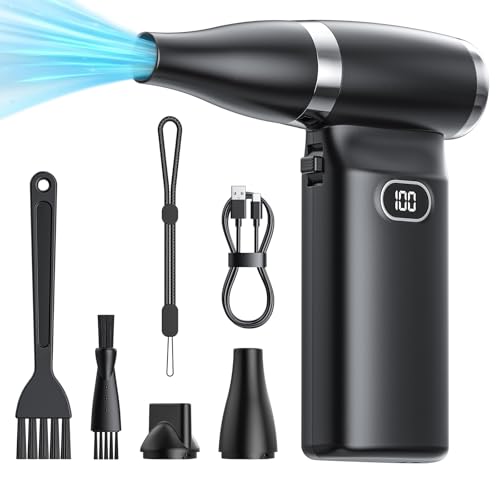
GANDASHI offers a strong airflow with an over 60 MPH output and a 6000mAh battery for about an hour of continuous cleaning. It uses brushless motors for longevity, making it a sustainable alternative to canned air. This model is better for larger dusting jobs and reaching tight crevices in keyboards, car interiors, and electronics. Limitation: airflow consistency may vary with battery level, so plan for shorter sessions on low charge.
MiaEpic Compressed Air Duster

The MiaEpic model reaches up to 280,000 RPM with a 4-gear setting and five nozzles for precision cleaning. It is best for tech enthusiasts who need high-pressure blasts in tight spaces such as PC towers, keyboards, and camera lenses. The USB-C fast charging keeps it ready for quick cleanup bursts. Caution: the high RPM can generate strong air jets that may dislodge delicate components if used at maximum on fragile parts.
POMELS 110000RPM Rechargeable Duster

POMELS balances power and portability with a 110,000 RPM motor and three-speed options. It also includes an LED indicator for battery status, and a lanyard for easy carry. This model is well suited for students and mobile workers who need reliable cleaning on the go. Better for: lighter or moderate dusting tasks in laptops, keyboards, and car interiors. Limitation: LED features drain the battery faster than basic models.
Anoiiv 130,000RPM Duster

The Anoiv unit delivers a top speed of 130,000 RPM and three adjustable speeds, with a lightweight design (about 0.45 lb) and a included lanyard. It’s ideal for home, office, and travel cleaning. Choose this if you need a compact, everyday duster with solid power. Caution: some users may prefer larger nozzle attachments for heavy debris in larger spaces.
IT Dusters AirTec Ultra Type 6

The IT Dusters AirTec Type 6 fuses a 480W motor with high airflow of 125 mph and six nozzle attachments. It is best for serious tech cleaning, including PCs, consoles, and servers, as well as home appliances. It includes a canvas drawstring bag for storage, which helps organize multiple attachments. Limitation: larger setup may be less convenient for quick, one-handed cleanups.
Buying Guide: Key Purchase Considerations
- Airflow Power and Speed Settings: Higher RPM or mph means stronger jets for deep cleaning. For delicate electronics, look for adjustable speeds to avoid damage.
- Battery Life and Charging: Longer runtimes reduce interruptions. USB-C or fast charging helps when you clean in bursts between tasks.
- Portability and Weight: Lighter devices are easier for on-the-go use. Consider a model under 0.5 lb if you clean for extended periods.
- Nozzle Attachments: A variety of nozzles improves reach in keyboard gaps, vents, and camera lenses. Look for sets with at least 4–6 attachments.
- : LED indicators help monitor battery life and mode. They can be practical for low-light tasks.
- : Reusable electric dusters reduce waste compared to canned air. This supports longer-term cost efficiency.
Practical buying questions
- What is the best option for desktop computer cleaning? Look for high RPM and precision nozzles to target keyboard and motherboard dust without disturbing components.
- Which model suits travel or classroom use? A compact, lightweight unit with a lanyard, multiple nozzles, and USB-C charging is ideal.
- Are LED features worth it? Yes, if you work in dim spaces or need battery monitoring during longer sessions.
- Should I avoid certain materials? Avoid excessive pressure on fragile screens or lenses; use gentler speeds for delicate items.
Frequently Asked Questions
- How does an electric air duster compare to canned air? It provides a consistent airflow without ongoing disposal costs and is more environmentally friendly.
- Can these devices replace all canned air uses? They’re best for electronics and tight spaces, not for large, open-area cleaning.
- Is battery life enough for all-day use? It depends on model and settings; choose a higher capacity battery for longer sessions.
- Do they damage sensitive components? Use lower speeds for delicate parts and test on inconspicuous areas first.
- Are attachments important? Yes; multiple nozzles improve cleaning precision in different spaces.
- What maintenance is required? Keep nozzles clean, recharge after use, and store in a cool, dry place.