If you need a 16-sheet paper shredder, you’re looking for a model that can securely turn multiple sheets and common media into tiny particles while staying reliable for daily use. These picks are best for small offices, home offices, or personal data protection where high-security shredding is essential. The list below covers top-performing machines that handle CDs, credit cards, staples, and clips, with varied running times and Bin sizes to suit different spaces and workloads.
Buyer snapshot: The following table highlights the five selected shredders, including run time, security level, and waste-bin capacity to help you compare quickly.
| Product | Security Level | Shreds | Run Time | Bin Space |
|---|---|---|---|---|
| Locksworth 16-Sheet Cross Cut | P-4 | 16 sheets, CDs, cards | 60 minutes | 6 gallon |
| BONSEN 16-Sheet (S3102) | P-4 | 16 sheets, CDs, cards | 60 minutes | 5.3 gallon |
| Amazon Basics 24-Sheet Cross Cut | P-4 | Up to 24 sheets | 40 minutes | 6 gallon |
| Bonsaii 18-Sheet (C149-C) | P-4 | 18 sheets, CDs, cards | 60 minutes | 6 gallon |
| Amazon Basics 12-Sheet (New Model) | P-3 | 12 sheets, cards | 9 minutes | 6 gallon |
Locksworth 16-Sheet Cross Cut Paper Shredder

Best for heavy daily use in small offices. The Locksworth model handles 16 sheets per pass and accepts CDs, credit cards, staples, and clips. It offers a P-4 security level with 4 x 30 mm cross-cut particles, making it ideal for sensitive documents. Its 60-minute continuous run time reduces frequent pauses, and a 6-gallon pull-out bin helps maintain workflow. The safety stop triggers when the bin is pulled out to prevent accidents.
Who it’s best for: small offices or home offices that require high-security shredding with long continuous operation. Choose this if you process mixed media and need clear jam clearance via the REV function. Caution: occasional larger jams can occur if the bin is near full; ensure bin is emptied promptly to maintain performance.
BONSEN 16-Sheet Heavy Duty Shredder (S3102)

Best for quiet, longer work sessions in busy offices. This model shreds 16 sheets per pass into 13/64 x 63/64″ particles with a P-4 security level. It features a patented cooling system to sustain 60 minutes of continuous running and a 5.3-gallon bin. It includes auto start/auto reverse to handle jams and light indicators for overheating or overload. It’s suited for tasks that require steady performance with moderate noise control.
Who it’s best for: offices needing extended run time with reliable anti-jam features and a compact footprint. Opt for this if you frequently shred large stacks of paper but still want a manageable bin size. Limitation: the 5.3-gallon bin means more frequent emptying versus larger-capacity models for high-volume shredding.
Amazon Basics 24-Sheet Cross Cut Shredder
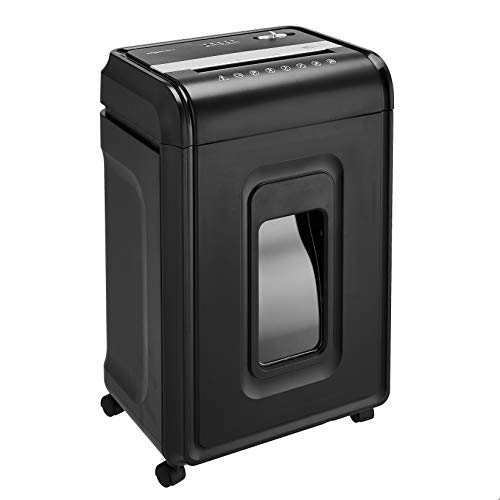
Best for higher-volume needs with strong security. This shredder handles up to 24 sheets at once and is capable of destroying CDs, DVDs, and credit cards (one at a time). It uses a 4 x 38 mm (approximately 5/32″ x 1-1/2″) cross-cut pattern, meeting P-4 security standards. It features a 6-gallon pullout bin and runs for 40 minutes with a 50-minute cooldown period to protect the motor from overheating. The dedicated card slot is convenient for frequent card shredding.
Who it’s best for: small offices or home offices with regular high-volume shredding and media-destruction needs. Choose this if you want strong security without exceeding a typical desk footprint. Caution: continuous use beyond run-time limits triggers auto-shutoff to prevent motor damage.
Bonsaii 18-Sheet C149-C Shredder

Best for extended sessions with a larger shredding capacity. The Bonsaii C149-C handles 18 sheets per pass and shreds into 13/64 x 63/64 inch particles at a P-4 level. It features a 60-minute continuous runtime with a 6-gallon pullout bin and four casters for mobility. Auto start/reverse helps clear jams, and a low-noise design reduces office disruption. This model suits busy home offices or small workspaces that require reliable, heavy-duty shredding.
Who it’s best for: users who need higher capacity than 16 sheets and a straightforward jam-clear workflow. Pick this if you value long continuous operation and easy movement. Limitation: the cooling period is necessary after long use, so plan for cooldown intervals during peak shredding tasks.
Amazon Basics 12-Sheet Cross-Cut Shredder (New Model)

Best for compact spaces with moderate daily use. This model shreds up to 12 sheets per pass and accepts credit cards through a dedicated slot. It produces a 0.2 x 1.2 inch (5 x 30 mm) cross-cut pattern meeting P-3 security. It runs for 9 minutes with a 30-minute cool-down period, balancing performance with energy efficiency. Auto shutoff protects the motor if the run time is exceeded.
Who it’s best for: individuals or small offices with lighter shredding needs and limited workspace. Choose this if you want a low-profile machine with essential media destruction. Caution: the 9-minute run time can require more frequent rest periods under heavy use.
Bonsaii 15-Sheet C243-A Shredder

Best for mixed-material shredding with clear indicators. The C243-A handles 15 sheets at a time and shreds into 5 x 30 mm particles at a P-4 level. It includes auto start/stop, reverse, and a transparent bin window for easy monitoring. Continuous operation is limited to 10 minutes per cycle with a 30-minute cooling period. It’s portable enough for around-the-desk use and provides straightforward jam control.
Who it’s best for: users who want a balance of security and ease of use in a compact shredder. Choose this if you want dependable auto features and clear bin visibility. Limitation: the shorter run time means more downtime for cooling on heavier workloads.
Buying Guide: Key Considerations for 16-Sheet Shredders
- Security Level: All recommended models meet at least P-3 or P-4, which matters for sensitive documents. P-4 provides smaller particle sizes and higher protection.
- Run Time vs. Cool-Down: If your workflow involves long shredding sessions, prefer models with 60-minute continuous runs and longer cooling periods.
- Bin Capacity and Visibility: A larger bin reduces interruptions, while a transparent window helps you avoid overflow.
- Media Compatibility: Check whether CDs, DVDs, credit cards, staples, and paper clips are supported, and whether there is a separate slot for media cards.
- Noise and Footprint: For shared spaces, consider quieter models and those with compact footprints to fit on or under desks.
- Jam Prevention: Auto start/stop, auto reverse, and REV functions help minimize downtime due to jams.
- Cooling Technology: Patented cooling systems extend continuous operation; assess warranty or service details if available.
FAQ
- What does P-4 security mean?
P-4 indicates a high-security level that produces small, confetti-like particles, reducing the chance of reconstructing sensitive information.
- Do these shredders shred CDs and credit cards?
Yes, all listed models support CDs and/or credit cards, though some have dedicated slots. Always verify media compatibility in the product details.
- Is a longer run time always better?
Longer run times reduce interruptions, but you may pay with more heat generation. Choose based on typical daily volume and cooling needs.
- What is a good bin size for a small office?
6 gallons is common for compact setups, balancing space and the need for less frequent emptying.
- Should I prioritize auto jam protection?
Yes. Auto reverse and jam-clear features save time and extend shredder life in busy environments.