Answering the common need for safer, cleaner workdays, this article highlights auto vacuum switches that pair with power tools to automate dust collection. Best for woodworkers, hobbyists, and shop setups where dust control matters. Each top pick is evaluated for ease of use, reliability, and suitability to typical tool configurations. The following buyer’s guide and product comparisons help you choose a switch that reduces circuit overload risk and keeps your vacuum in sync with your tools.
Summary of selected products:
| Product | Best For | Key Benefit | Delay/Threshold |
|---|---|---|---|
| Automatic Vacuum Switch, Ortis | General woodworking and small shops | Delays vacuum to prevent overload, keeps workspace cleaner | Delay on/off |
| SENCTRL Automatic Vacuum Switch | Table saws and dust collectors | Load sensing with auto on/off | Auto start with delay off |
| Automatic Vacuum Switch, Ortis Autoswitch | Power tools with varying loads | Adjustable actuation threshold | Adjustable threshold |
| SENCTRL Automatic Vacuum Switch (Safety Overload) | Woodworking setups with overload concerns | Safety overload circuit breaker | Auto shutoff/delay |
| O’SKOOL Automatic Vacuum Switch | Compact shops and hose-clear tasks | Plug-and-go dust control with 10-second delay | On delay, 10-second off |
Ortis Automatic Vacuum Switch

Ortis Automatic Vacuum Switch is best for general woodworking setups where a simple, reliable auto-start/stop is desired to keep dust collection synchronized with basic tools. The product description emphasizes overload prevention to minimize tripping and reduce nuisance shutdowns. Suitable for hobbyists and small shops seeking straightforward automation.
Caution: Ensure the switch’s electrical load is compatible with your vacuum and tool outlets to avoid overloads.
SENCTRL Automatic Vacuum Switch

SENCTRL Automatic Vacuum Switch for Power Tools offers load sensing with auto on/off, and is positioned as a fit for table saws and shop dust collectors. This model emphasizes preventing overload while keeping the vacuum engaged during active tool use. Best for users who want a responsive system that adapts to tool activity and load.
Caution: Verify that the load sensing threshold aligns with your tool’s draw to avoid false starts or unintended operation.
Ortis Autoswitch

Ortis Autoswitch is suitable for tools with varying loads and offers an adjustable actuation threshold. This helps tailor the switch sensitivity to different tools. Best for workshops needing a customizable activation point to prevent nuisance starts or stops.
Caution: If the actuation threshold is set too high, a tool with low current draw may fail to trigger the vacuum automatically.
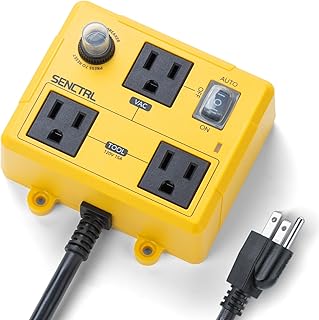
SENCTRL Automatic Vacuum Switch for Power Tools with Safety Overload offers a balanced approach for preventing overload while staying engaged during active tool use. It’s a solid choice for woodshop setups where preventing circuit overload is a priority. Best for users who need a safety-focused auto-switch that minimizes nuisance shutdowns.
Caution: Check the environmental fit; some configurations may require additional adapters or mounting options for optimal performance.
O’SKOOL Automatic Vacuum Switch

O’SKOOL Automatic Vacuum Switch provides plug-and-go dust-control suited for hose clearing tasks. It keeps suction on to clear dust and uses a 10-second delay after the tool stops. This model is best for compact shops and setups that require quick, simple automation with predictable delay behavior.
Caution: The 10-second delay may be insufficient for long dust runs; consider a longer or adjustable delay if your workflow routinely leaves residual dust in hoses.
Buying Guide: Key Considerations For Auto Vacuum Switches
What should you look for when choosing an auto vacuum switch?
- Delay timing: A longer delay helps clear dust in hoses; shorter delays reduce wasted airflow. Match to your typical tool and workflow.
- Load handling and actuation: Ensure the switch can handle your vacuum’s current draw and your tool’s starting surge. Adjustable thresholds are helpful for mixed-tool setups.
- Auto on/off behavior: Decide if you want immediate vacuum start with tool activation or a load-sensing approach that only triggers when the tool draws power.
- Outlets and wiring: Some switches offer dedicated tool outlets and vacuum outlets. Confirm compatibility with your tools and shop vac.
- Safety and overload protection: Look for features that prevent circuit overloads and protect both tools and power strips.
- Installation simplicity: Plug-and-play designs work well for small shops; more complex models suit larger setups with multiple tools.
Frequently Asked Questions
- What is the primary purpose of an auto vacuum switch?
To automatically start and stop a dust collector or shop vacuum in sync with a power tool, improving dust control and protecting circuits from overloads.
- How do I choose between auto start and load-sensing switches?
Auto start toggles the vacuum when the tool begins; load-sensing adapts to actual current draw, potentially reducing false starts. Choose based on tool mix and reliability needs.
- Can these switches work with any vacuum or tool?
Most are designed for common shop vacs and power tools, but always check the load specifications and outlet compatibility for your exact models.
- Are adjustable thresholds important?
Yes, if you have tools with varying start-up currents. Adjustable thresholds help prevent nuisance starts or missed activations.
- Is a delay-off feature necessary?
Yes, a delay helps clear remaining dust from hoses and ducts after a tool is turned off, reducing clogs and improving cleanliness.
- What’s a practical delay time to start with?
Common ranges are 5–15 seconds for many shop setups. Start with 10 seconds and adjust based on hose length and dust clearance needs.