When choosing a commercial office shredder, the key goals are high capacity, strong security, and reliable performance for long workdays. This guide highlights top options suited for busy offices, finance teams, and administrative departments that demand continuous shredding without frequent downtime. The following picks balance auto-feed convenience, security levels, and durability to support data protection compliance and daily workflow.
Summary of selected products:
| Product | Auto Feed | Security | Run Time | Best For |
|---|---|---|---|---|
| Aurora Commercial Auto Feeder | Yes (200 sheets) | P-5 | 60 minutes | High-volume security shredding |
| BONSEN 300-Sheet Auto Feed | Yes (300 sheets) | P-4 | 60 minutes auto, 30 manual | Large daily tasks |
| Bonsaii 200-Sheet Auto Feed | Yes (200 sheets) | P-4 | 60 minutes | Medium-to-large offices |
| Amazon Basics 200-Sheet Auto Feed | Yes (200 sheets) | P-4 | 60 minutes auto | Value-conscious offices |
| Bonsaii Micro-Cut 120-Sheet | Yes (120 sheets) | P-4 | 60 minutes auto, 60 minutes manual | Home offices with light commercial needs |
Aurora Commercial Grade 200-Sheet Auto Feed Shredder
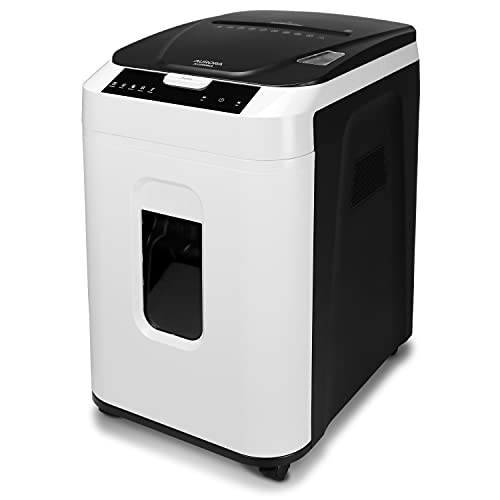
Best for security-focused, high-volume offices that need continuous operation. This model supports automatic shredding up to 200 sheets and a manual slot for smaller tasks, with a robust 60-minute run time. It uses micro-cut shredding to produce tiny particles, meeting high security level P-5 requirements. It is designed for quiet operation and anti-jam auto-reverse to clear paper jams, reducing downtime during busy periods.
Who it’s best for: financial services desks, legal firms, or facilities handling sensitive documents and requiring top-tier privacy with long, uninterrupted duty cycles. Why selected: combines maximum auto-feed capacity with high-security output and continuous operation without frequent cooldowns.
Limitation: Micro-cut shredding creates a very large number of tiny pieces; ensure waste disposal bins are emptied regularly to avoid buildup during long runs.
BONSEN 300-Sheet Auto Feed Shredder

Better for large-volume daily tasks where hands-free shredding saves time. This model offers auto feeding for up to 300 sheets and manual capability for occasional heavy loads, plus a 60-minute auto-run time and 30-minute manual mode courtesy of an advanced cooling system. It operates relatively quietly at 58dB, making it suitable for open-plan offices without excessive noise.
Who it’s best for: busy front-desk teams, HR departments, or accounting offices handling large paper volumes. Why selected: the 300-sheet auto feed delivers strong throughput, while the dual-mode operation accommodates mixed materials when needed.
Limitation: longer auto-run periods require consistent bin management to avoid jams from oversized dumps in a single session.
Bonsaii 200-Sheet Auto Feed Shredder

Ideal for medium-sized offices seeking a balance of capacity and security. It shreds up to 200 sheets automatically and supports manual feed, with an 8.1-gallon bin and wheels for easy relocation. Its P-4 high-security micro-cut format reduces paper to small confetti-like pieces, helping protect sensitive information.
Who it’s best for: mid-size administrative teams or marketing departments that handle a mix of documents daily. Why selected: strong auto-feed capability with mobility features and a practical bin size for continuous shredding sessions.
Limitation: larger auto runs may require periodic cool-down breaks to prevent overheating in high-use environments.
Amazon Basics 200-Sheet Auto Feed Cross-Cut Shredder

Best value-for-money option with solid auto-feed capability and reliable performance. This cross-cut shredder meets P-4 security standards and supplies a 200-sheet auto feed with an 8.5-gallon pullout bin. It shreds into smaller confetti pieces, balancing security with cost efficiency for typical business needs. Run times are 60 minutes in auto mode and 10 minutes in manual mode, followed by a cooldown period.
Who it’s best for: startups or small to mid-sized offices seeking a dependable, budget-conscious solution. Why selected: straightforward operation, adequate security, and a practical bin size for standard document destruction.
Limitation: cross-cut output is larger than micro-cut; for highly sensitive materials, consider higher-security models if needed.
Bonsaii Paper Shredder for Office, 120-Sheet Autofeed
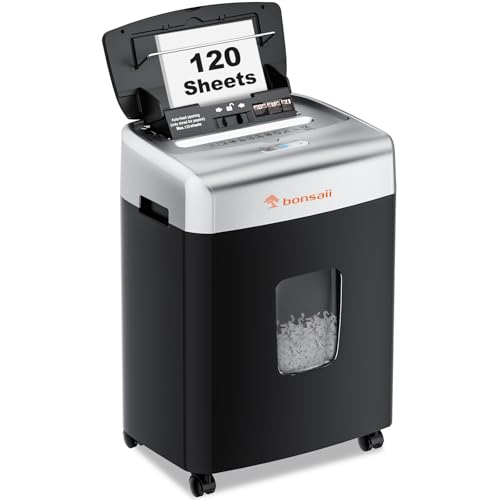
Best for home offices transitioning to light commercial use or small teams needing consistent performance. It supports auto shredding of up to 120 sheets and 12-sheet manual feeding, offering a practical 71 inches-per-minute shredding speed. The unit uses micro-cut technology for privacy protection and has a 6-gallon bin, balancing capacity with footprint.
Who it’s best for: small businesses, home offices, or departments handling regular but moderate confidential document destruction. Why selected: efficient auto mode paired with a manageable bin size and a quiet operation profile for shared workspaces.
Limitation: manual mode has a shorter continuous runtime, and users should plan cooldowns for longer shredding sessions.
Buying Guide: Key Purchase Considerations
Auto-feed capacity and cycle time: Choose a model with auto-feed capacity matching your daily volume. For high-volume offices, aim for 200–300 sheets per cycle and a long continuous run time.
Security level: P-4 micro-cut offers strong protection; P-5 is the highest common standard for sensitive documents. Select according to data protection requirements and regulatory expectations.
Shred size and type: Micro-cut creates much smaller particles than cross-cut. If you manage highly confidential materials, micro-cut or better is preferable, even if it increases bin fill frequency.
Run time and cooling: Long-running auto modes require efficient cooling and air-flow. Look for models with adjustable or dual cooling systems to minimize downtime.
Bin capacity and mobility: Larger bins reduce emptying frequency, while wheels and pull-out bins ease office-wide shredding tasks. Consider space constraints and how often staff will move the shredder.
Noise level: For open-plan offices, quieter shredders improve comfort and productivity. Check dB ratings and machine enclosure design when noise is a concern.
Maintenance features: Anti-jam functions, reverse modes, and indicator alerts help maintain throughput and minimize downtime during busy periods.
FAQ
- What is the difference between P-4 and P-5 security levels? P-4 produces smaller particles than most standard shredders, while P-5 creates even finer micro-pieces, offering greater privacy and protection for sensitive documents.
- Should I prioritize auto-feed capacity over manual feed? If your team processes large volumes of paper daily, auto-feed capacity is essential. Manual feed is useful for occasional bulky items or special materials like staples or credit cards.
- How long can a commercial shredder run continuously? Run times vary by model; look for 30–60 minutes of continuous auto-feed operation with cooldown periods to prevent overheating and jams.
- Is cross-cut as secure as micro-cut? Cross-cut is secure, but micro-cut (and especially P-5 micro-cut) provides significantly smaller particle sizes and higher privacy protection for sensitive documents.
- What should I consider about bin capacity? Larger bins reduce downtime but require more space. Balance bin size with expected daily shredding volume and cabinet space.
- Are these shredders suitable for CDs or credit cards? Many models offer manual shredding for staples, credit cards, and CDs. Verify compatibility if you frequently destroy non-paper items.