Looking for a compact cleaning tool that keeps keyboards, desktops, and laptop ports free of dust? This guide highlights five top mini vacuum cleaners designed for PC setups, keyboards, and small workspaces. Each option is chosen for tight spaces, portability, and practical 3-in-1 or 4-in-1 functionality. Ideal buyers include students, remote workers, gamers, and professionals who want quick, mess-free maintenance without large equipment.
| Product | Best For | Key Benefit |
|---|---|---|
| Meudeen 14500 Pa Computer Vacuum Cleaner | Everyday desk cleanup | Strong suction in a compact form |
| Meudeen Air Duster – PC Cleaner | Hard-to-reach gaps and camera lenses | Multiple accessories for versatile use |
| Car Vacuum Portable 4-in-1 | Car interiors and desk spaces | High suction with long runtime |
| Hayousui 4.3Kpa Keyboard Cleaner | Tight crevices and keyboards | Four-mode versatility with washable filter |
| Vcwtty 3-in-1 Air Duster & Vacuum | Canned-air replacement on desks | USB-C recharge and clear dust cup |
Meudeen 14500 Pa Compact Computer Vacuum

This 3-in-1 device functions as a mini vacuum, an air duster, and an air blower. It’s designed for keyboard cleaning and can also seal vacuum storage bags. Best for users who want a single tool that tackles dust in a compact package. The dual 2500 mAh cells provide longer run times, with a total 500 charging-cycle resilience noted in specs. Suitable for students and home offices needing portable, multi-use cleaning power.
Best for: users who prefer an all-in-one gadget for desks and keyboards. Better for: quick dusting and light vacuuming without switching tools. Choose this if: you want a compact device that doubles as an air duster. Avoid this if: you need industrial-grade suction for heavy debris.
Meudeen Air Duster PC Cleaner (Air-01)

Meudeen’s Air Duster variant emphasizes a 3-in-1 approach with extensive accessory options. It can clean keyboards, car interiors, camera lenses, and small crevices. The device uses built-in 2500 mAh cells for long life, with a 3–4 hour charge time. This model is best for multi-space cleaning where a flexible set of attachments expands reach and precision.
Best for: multi-space cleaning beyond the desk. Better for: keyboards, cameras, and tight crevices. Choose this if: you need multiple configurations to adapt to different objects. Caution: ensure you don’t over-activate the blower in sensitive electronics environments.
Voice-tank Car Vacuum Portable 4-in-1

Although marketed for cars, this 4-in-1 cordless vacuum is well-suited for desks and keyboards as well. It features four functions: vacuuming, blowing, inflating, and suction. With an 80,000 RPM brushless motor and two runtime modes, it supports long Eco sessions and shorter Max bursts. Best for: compact desks that double as vehicle workstations. Limitation: Max mode can reduce runtime on larger messes, so plan cleaning in stages.
Best for: quick desktop refreshes and keyboard workspaces. Better for: users who appreciate a robust accessory set. Choose this if: you want a powerful motor in a travel-friendly form. Avoid this if: you need sustained Max mode performance for extended sessions.
Hayousui 4.3Kpa Keyboard Vacuum Cleaner
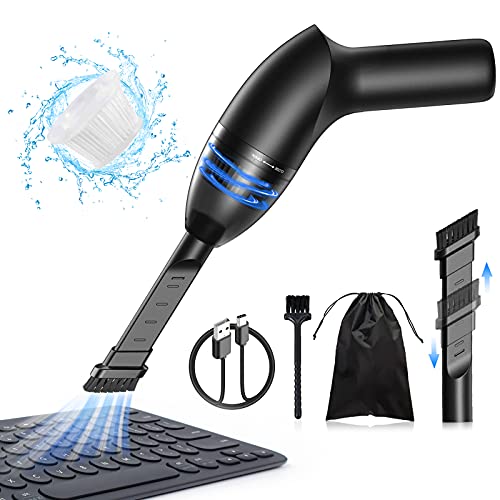
This handheld vacuum focuses on tight crevices with a 4.3Kpa suction level and a 2-in-1 nozzle. The device includes multiple modes and a washable HEPA filter, making maintenance straightforward. It’s ideal for laptops, desktops, and shelves where crumbs accumulate. The HEPA filter helps maintain air quality by capturing fine dust, though frequent cleaning of the filter is recommended to sustain suction efficiency.
Best for: precise dusting in tight spaces. Better for: keyboards and desk edges. Choose this if: you value washable filtration. Caution: the smaller form factor may limit overall debris capacity compared to larger handheld vacuums.
Vcwtty 3-in-1 Air Duster & Vacuum

Vcwtty’s device combines a 12000 Pa air duster, vacuum, and brush cleaning in one. It’s designed for PCs, keyboards, desktops, and even pet-hair cleanup. USB-C recharge and a reusable, rinse-friendly dust cup support easy maintenance. Best for: replacing disposable canned air with a rechargeable option. Limitation: the device’s suction power is optimized for light debris, not heavy messes.
Best for: eco-friendly desk cleaning. Better for: frequent keyboard maintenance and light dusting. Choose this if: you want a single tool that can sweep and suction with a visible, rinse-ready dust cup. Avoid this if: you need industrial suction power for large debris.
Buying Guide
Key purchase considerations help separate good options from less suitable ones for PC cleaning. Consider the following:
- Suction power and air-blast capability: For keyboards and desktops, moderate suction (around 10,000–15,000 Pa) plus a strong air blast helps dislodge dust from tight gaps without damaging components.
- 3-in-1 or 4-in-1 versatility: If you want a single tool for vacuuming, blowing, and dusting, prioritize models explicitly marketed as multifunction devices with included nozzles for crevices and vents.
- Battery life and charging: For cordless devices, longer run time matters during extended cleaning tasks. USB-C or fast charging is a plus for quick top-ups.
- Filtration and maintenance: Washable filters and transparent dust cups make it easier to gauge when to empty or clean the container, preserving suction.
- Size and weight: Compact dimensions improve reach under keyboards and around laptops. A lighter device reduces fatigue during routine maintenance.
- Accessories and attachments: Look for precision nozzles, crevice tools, and brush heads that target keyboard gaps, fan vents, and camera lenses.
- Durability and safety considerations: Ensure the device is designed for electronics cleaning and won’t generate static or excessive heat during use.
FAQ
- What is the best mini vacuum for keyboard cleaning?
A device with precise crevice nozzles, gentle suction, and a washable filter works well for keyboards. Models offering 3-in-1 functionality provide flexibility for both vacuuming and blowing dust from between keys.
- Are USB-C charged cleaners better than standard micro-USB?
USB-C charging generally offers faster charging and broader compatibility with modern devices, which is convenient for frequent use.
- Can a mini vacuum damage electronics?
Most consumer mini vacuums designed for electronics are safe when used as directed. Avoid aggressive suction in sensitive components and use the appropriate nozzle for gaps and vents.
- Should I choose 3-in-1 or 4-in-1 models?
Both provide multiple cleaning functions; choose 3-in-1 if you don’t need inflated or inflated features, and 4-in-1 if you want additional tools for more surfaces.
- What maintenance helps maintain suction?
Regularly empty the dust cup, clean or replace filters, and inspect nozzles for blockages to maintain optimal performance.
- Is a longer runtime important for desk cleaning?
Yes, especially if you have a large workstation or multiple devices. Look for models with longer Eco-mode runtimes and efficient charging options.