If you’re looking for an effective portable cleaner for your PC, an electric air duster can replace canned air for quick, reusable dusting. These devices are ideal for tech enthusiasts, home office setups, and anyone who wants a fast, chemical-free way to clear keyboards, PC towers, and peripherals. Below are five strong options, chosen for their power, ease of use, and practical features. The buyer-friendly notes explain who each product suits best and why it stands out. A quick comparison table helps you compare core specs at a glance.
| Product | Best For | Key Benefit |
|---|---|---|
| MiaEpic Z3 | Power users needing long runtime | High RPM with LCD readout |
| Meudeen Air Duster | Budget-conscious, basic needs | Solid two-gear option |
| KKH Portable Electric Air Duster | Lightweight, on-the-go cleaning | 4 speed settings |
| 110000RPM LED Duster | All-around home and office | Multiple nozzles and brushes |
| FRESMOL Compressed Air Duster | Smart LED, adjustable speeds | Rechargeable, 3 gears |
MiaEpic Z3 Electric Air Duster

Best for long cleaning sessions and detailed PC work. The MiaEpic Z3 uses a high-speed brushless motor that reaches up to 280,000 RPM, delivering strong, high-pressure airflow ideal for clearing stubborn debris from PC components, keyboards, and other electronics. Four adjustable speed settings let you tailor airflow for sensitive parts or heavy-duty dusting. The built-in LCD screen shows battery status and speed levels, reducing surprises during use. An LED light illuminates dark corners, aiding precision cleaning in tight spaces.
Who it’s best for: power users, gamers, or tech hobbyists who need consistent performance and on-device status indicators. Why selected: combines high RPM with practical brightness and battery visibility, making it a versatile desktop cleaning tool. Caution: higher speeds drain the battery faster; plan charging if you have a long cleaning session.
Meudeen Air Duster

Best for simple, daily dusting tasks and light-duty use. The Meudeen Air Duster offers two gear speeds, providing a straightforward option for quick keyboard and desk area cleaning. It’s a compact, budget-friendly choice suitable for users who don’t require extended runtime. Caution: it uses less power than higher-end models, so more frequent charging may be needed for long sessions.
KKH Portable Electric Air Duster

Best for lightweight portability. The KKH duster is designed as a pocket-sized tool with a 120,000 RPM turbo airflow and four adjustable settings. It’s ideal for on-the-go cleanups, whether at home, in the office, or while traveling. The main advantage is its compact weight, making it easy to carry in a bag. Limitation: without heavier build or extended runtime, it may be better for quick, spot-cleaning rather than long, deep sessions.
Compressed Air Duster with LED Light (110000RPM)

Best for all-around home and office use. This duster delivers up to 110,000 RPM with LED lighting to illuminate dark spaces. It comes with multiple attachments for keyboards, laptops, cameras, and car interiors, plus a rechargeable battery for mobility. Consider this if you want a versatile tool that’s fine for desktops and household tasks. Caution: LED brightness helps visibility, but battery life varies with speed settings and usage.
FRESMOL Compressed Air Duster
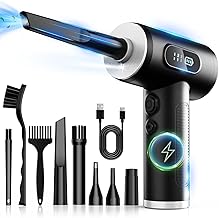
Best for rechargeable convenience with smart display. FRESMOL offers a 100,000 RPM motor and three airflow speeds, plus a smart LED display to monitor speed and battery level. This model is suitable for PC towers, keyboards, and car interiors. A practical pick for users who prefer quick power checks and adjustable airflow. Limitation: no stand-alone proprietary battery details; plan for regular charging like other rechargeable dusters.
Buying Guide: Portable PC Dust Cleaners
- Power and speed: Higher RPMs deliver stronger blasts for stubborn debris, but consume battery faster. Choose a model with adjustable speeds if you clean sensitive components.
- Runtime and charging: Look for longer run times and USB-C or Type-C fast charging if you need quick recharges between cleanings.
- Battery type and life: Rechargeable lithium batteries are common; verify replacement availability and expected lifespan.
- Attachments: Various nozzles and brushes expand uses beyond keyboards to fans, vents, and interiors of devices.
- Lighting and display: LED lights aid visibility in dark spaces; an LCD or LED display helps monitor battery and speed levels.
- Portability: For frequent on-the-go use, weight and size matter. Pocket-sized options are convenient, while larger units may offer longer runtimes.
- Eco-friendliness: Reusable dusters reduce waste from canned-air products and can lower long-term costs.
- Safety and compatibility: Ensure the device is safe for electronics and doesn’t generate static discharge or heat during use.
FAQ
- Q: Are electric air dusters safe for all PC components? A: They are generally safe for keyboards, desktops, and peripherals when used at appropriate speeds and at a safe distance from sensitive components.
- Q: Can these replace canned air entirely? A: They can replace many routine dusting tasks, especially for keyboards and components, but may not remove every type of residue in very tight spaces.
- Q: Do they require frequent charging? A: Runtime depends on speed and model; higher RPMs use more battery, so plan for recharging between sessions.
- Q: Do these devices come with multiple nozzles? A: Many models include various nozzles and brushes to fit different cleaning tasks and spaces.
- Q: Is LED lighting necessary for cleaning? A: LED illumination helps in dark areas and tight corners, improving cleaning precision.
- Q: Are these environmentally friendly? A: Rechargeable models reduce the need for disposable canned air, cutting waste over time.